Thursday, December 17, 2015

The best camera is the one you have with you, and for most of us that means our go-to gadget for taking pictures is our smartphone.
Choosing a phone with a great camera is only part of the equation, though. The apps you use with it — and after the fact, by enhancing your photos — are equally important.
Here, as part of our series on Android photography, we present some of our top picks for taking great photos on your Android phone, making them even better, and sharing them with the world.

1. Google Camera

Google Camera
Google's own camera app, pre-loaded on Nexus phones and tablets, is fairly basic. It does have a fews things going for it, though, that you might not find in your phone's built-in camera app.
Photo Sphere, Panorama and Lens Blur: Three big reasons to try Google Camera.
Photo Sphere lets you create 360-degree images that you can explore, just like Street View in Google Maps, and you can view these through the Google Photos app, Google+ or share them with the world through Google Maps on the web.
Google's nifty Panorama shooting mode uses similar technology to stitch together a continuous stream of images into one extra-wide panoramic shot. And it actually does a better job at this than some manufacturers' built-in camera offerings.
Finally there's Lens Blur mode, which lets you artistically defocus the background when taking shots of close-up objects, giving a DSLR-like effect to your shots — not perfect for every image, but striking in the right situation.
Download: Google Camera

2. Google Photos

Google Photos
You might think of Google+ as a social network, first and foremost, however the Photos app bundled with it has a host of useful features to help you get the most out of your pictures. You can automatically backup your photos and videos to Google's cloud, making them available on every Android device you own, and view highlights of each day, so you don't need to scroll through all your photos to find the best ones.
One of Google Photos' best features is Auto Awesome, which you might have also seen in Google+ on the web. Take a bunch of photos and it'll periodically "gift" you enhanced versions of them to sit alongside the originals in your collections — think animated GIFs if you've taken a burst shot, Instagram-style filters and contrast-boosted versions of washed-out shots. Take a series of images from different perspectives and you might even end up with an auto-generated Panorama based on these pics.
The 'Photos' app bundled with Google+ has more features than you might think...
The Auto Awesome feature also lets you create HTC Zoe-style video highlights reels based on a series of images and videos. And if you're going on vacation, Photos can sort your images and videos into a chronological story book of your trip, ideal for sharing on Google+.
Photos even includes some of Snapseed's photo editing and filtering capabilities through its "edit" button, which is useful if you just want to tweak your shots or add filters without downloading a separate app.
Download: Google Photos (bundled with Google+)

3. Instagram

Instagram
Instagram is the original filtered photo-sharing app, now owned by Facebook and pretty much synonymous with smartphone photography. The Android version of the app has come a long way in recent months, making it easier to improve the way your photo looks beyond just slapping a filter on top and calling it a day.
Instagram is pretty much synonymous with mobile photography.
New filters are being added all the time, and for the most part they do a good job of giving photos character without stomping all over them. In addition to controlling lux and the level of filtering, you can tweak photos' color temperatures, adjust highlight and shadow brightness, add a vignette, sharpen and even introduce tilt-shift effects.
And from there, share to your timeline, or directly to specific people. Naturally, there's integration with Facebook, Twitter, tumblr, Flickr and Foursquare, too. And with the Photo Map feature, you can keep track of your top photo spots.
Download: Instagram

4. VSCO Cam

VSCO
Popular on iOS before making its way to Android last year, VSCO Cam aims to be your one-stop shop for photography and image editing on your Android phone. VSCO let's you capture images, tweak and tune them to your liking, sync them across devices and share them with the world. You can even discover the best original photography from other VSCO users through the Grid feature.
Like the rest of VSCO, the built-in camera app is relatively simple, offering basic controls including grid lines and flash toggles. When it comes time to enhance your photo, the app brings an assortment of filters to the table, along with the option to buy even more through in-app purchases. That's on top of the usual combination of dials to adjust brightness, contrast, saturation and other properties.
A recent update to the app also adds copy/paste batch photo editing.
With a strong focus on design, VSCO's minimalist UI is a joy to use, fitting somewhere between Instagram and standalone image enhancement apps. The curated Grid feature also means you'll never have to go far to find pretty pictures to look at.
Download: VSCO Cam

5. Camera 2

Camera2
Among the best dedicated camera apps on Google Play is Camera 2, by JFDP Labs. The app differs from many built-in offerings in that it gives you live previews of filters and effects applied to your shots in real-time. Some are artistic, others nerdy, and all of them bring something unique to the table. ASCII art? Check. Taking your own "Hope" poster style shots? That's built-in too, alongside countless others.
At the same time, you can tweak brightness, contrast and saturation levels and see these reflected in the live preview too. And if you've already taken photos using a different app, you can also load these into the app and play around with its various filters and settings.
Download: Camera 2

6. Camera Zoom FX

Camera Zoom FX
Camera Zoom FX is all about fine control over the photos you take on your phone. There's a ton of settings and options to work with — including software stabilization, a voice-activated shooting mode, HDR and collage mode, which can artfully arrange a series of shots for you.
The app also offers a bunch of overlays to help you take stable, well-composed shots, including a horizon indicator, which uses your phone's built-in sensors. That's in addition to resolution and aspect ratio settings, an assortment of focus modes, white balance options and a dedicated white balance mode.
If the camera app that came with your phone is a little light on features, Camera Zoom FX should be able to deliver the additional control you crave, helping you take great photos in the process. There's a limited free version available in addition to the $2.99 "premium" version of the app.
Download: Camera Zoom FX Free
Download: Camera Zoom Premium

7. Snapseed

Snapseed
Google's Snapseed is one of the most accessible photo editing apps for Android, with a wide range of features for experienced users and newcomers alike. At its most basic level, Snapseed let's you scroll vertically through image enhancement options, then drag horizontally to control the intensity of the effect.
The range of features is pretty diverse: everything from basic automatic color and contrast enhancement to cropping and sharpening, to selectively adjusting color properties within a particular radius. And of course it wouldn't be a photo editing app without the obligatory filters and frames, which are controlled by swiping, just like Snapseed's image tuning features.
If you're after a photo editing app that's powerful yet simple to learn, Snapseed strikes a great balance between the two.
Download: Snapseed

8. Pixlr

Pixlr
Pixlr, by Autodesk, is another powerful photo-editing app for Android, which expands upon what's offered in the Google Photos editor in a few ways. In addition to a full and very capable suite of image tubing and tweaking options — including some neat features like color splash, history brush and double exposure — Pixlr let's you add a range of artistic effects, borders, text and even stickers to your shots.
Like Snapseed and other apps, you can use Pixlr to make a good shot even better. But it's also possible to get really creative if you explore some of the more advanced capabilities.
In an ocean of apps done poorly, these rise to the top.
If you're reading this, chances are you have an awesome pocket computer running Android at your disposal. Today's Android phones and tablets can pretty much do anything, and that includes things of an adult nature. We want to help you find and see that content the best way possible.
We're not here to condone or condemn anyone or anything — and by all means let's keep things legal — but we feel that adults using their Androids to peruse adult content is just fine and dandy. We bet a good number of you guys and gals feel the same way.
If you don't agree, that's cool, too. We also are firm believers in the "live and let live" philosophy, and fully respect your opinion and support your right to have it. We also advise you to not click through the break if you think you might be offended. We love you regardless.
Don't worry, we're not trying to push any boundaries or limits (too terribly far), we just want to share a list of the best ways to find and browse adult content on Android. And do it in an adult way.
Namaste my friend. Namaste.
Article updated December 2015

There are countless ways to see adult content on your Android out there, covering a broad range of subject matter. This is our list of the best of the best, and ones we feel confident to recommend. Be sure to tell us in the comments if you know another we should have a look at. Sorting through apps is a tough job, and we always love hearing input about great stuff we need to check out.

1. MiKandi

Mikandi
If you're looking for a bit of everything sexy, kinky or naughty, MiKandi is where you'll want to start. Simply put, it's the best place to get curated adult theme applications for Android. Whether you want something silly that involves jiggling boobs, or want to see some gritty adult movie action, MiKandi has you covered.
MiKandi is its own app store, and uses its own virtual currency system. You'll find plenty of things that are free and every taste is covered. You will need to register with MiKandi to download and install apps, but there's really no reason not to. Millions of others have, and they don't spam you or share your details. It's worth it to know that you're installing apps that have been weeded through and the malware and garbage was thrown out.
To install the free MiKandi store, fire up the browser on your phone and here:

2. Weed Maps Marijuana Strains

Weed Maps
Just because you aren't allowed to do it where you live, doesn't mean it's not OK elsewhere. An important part of cannabis legalization is to treat it properly, and support legal vendors who aren't selling a dime-bag to your kids.
Again, folks. If it's not legal where you're at, don't do it.
That said, Weed Maps is wonderfully done, and will help you locate what you're looking for in the places where it's legal to sell it. You won't find anything about Craigslist dealers or shady online operations here.
Weed Maps not only helps you find where to buy Marijuana, it also tells you about discounts, exclusive offers and daily deals. Add in a section for reviews and a social network, and you have the makings of a great app for connoisseurs.

3. Tumblr

Tumblr
Tumblr is a great place to find blogs abut every subject you can imagine. Some are pretty amateurish, some much more professional, but the beauty of it all is having everything in one place — and in one app. When it comes to adult content, nothing changes.
You'll find everything at Tumblr. From the mostly tame to the extreme and graphic. From pros and amateurs alike. Whether you're looking for boys, girls or folks who don't identify with either (and no matter what you would like to see them doing) Tumblr will fix you up, for free.

4. Mixology Drink Recipes

Mixology
If you're going to have a drink or two, remember a few important things. First of all, you need to be a responsible adult. We don't condone or endorse underage drinking, nor do we want anyone to place themselves or anyone in danger. The next important thing is to learn to make a good drink.
That's where Mixology comes in. Thousands of recipes for just about any flavor of adult beverage are included, and sorting through them is dead simple. Browse by category, or tell the app what you have on hand and you'll find just the right recipe for a perfect cocktail. Or get adventurous and click that random tab — you might find something new. You can also find your local liquor store and learn a bit about just how to use common bartending tools to make that perfect drink.
The app is free, and if you're serious about mixing up those drinks a paid version is available.

5. Tinder

Tinder
Find people online for dating or other fun adult stuff via Tinder.
Sign in with Facebook, and swipe right until you find the person you want to talk to. Swipe right and see if they do the same. If so, it just might be the start of a love connection or a roll in the hay. We don't judge.

6. Literotica

Literotica
If you're a fan of erotic fiction, Literotica is for you. While you won't find Hemingway here, you will find erotic stories to fit any and every taste. Even some tastes you might not have even known existed.
The app is done well, too. You have settings for fonts and screen brightness, as well as a dark mode for some after-hours reading. The app even has an immersive mode for phones with on-screen buttons. Literotica is free, and filled to the brim with content.

7. BaconReader for Reddit

Bacon Reader
While Reddit is plenty popular with folks of all ages, there are parts that are absolutely NSFW and filled with content of an adult nature. We love an open and free Internet, so we're glad they are there. And we want you to be able to browse them the best way possible. Of course, the best way to see the not-so-kid-friendly content is also the best way to see all of what Reddit has to offer.
That's BaconReader. Subreddit grouping, filtering by domain and keywords, image uploading should you want to contribute and a great slideshow mode if you just want to look make BaconReader the best and most popular way to read Reddit — all of Reddit.
BaconReader is free and also looks great on your tablet!

8. Chanu - 4chan for Android

Chanu
Maybe Reddit is a bit to tame for you, and you want to go to the darkest pit of the Internet. You'll find that at 4chan. We won't judge /b/ro. We just want you to see 4chan the best way you can.
Chanu is that best way. You can favorite the boards you frequently visit, post replies or new threads using images from the web, your photos or right from your camera and even create watchlists to keep track of those threads where you don't want to miss a single post. Chanu even supports 4chan Pass for all the power users out there. The best part — it's also great for the excellent "safe" content you'll find at 4chan.
Chanu is free, and is optimized for both phones and tablets.

9. Google Cardboard

Google Cardboard
You know plenty of people are interested in Virtual Reality adult entertainment. A new way to interact with video or an app, VR lends itself to the adult world perfectly.
There are already plenty of websites that offer a bit of adult fun in the VR world, and to use them you'll need to have your viewer setup. The Google Cardboard app will get you started.
Download Google Cardboard

There's never been a better time to buy a cheap Android phone and still get a top quality experience.
It used to be the norm that to get a good phone you'd have to spend a good chunk of change. But while the high end continues to progress at a predictable rate, the mid-tiers have suddenly become where the action is at. It's easier than ever to get a quality Android smartphone without paying too much for it. We daresay you can call it a "cheap" Android smartphone at this point and not feel bad about it.
For around $250 it's now possible to get a good phone by any standard. Here's our roundup of the best you can get right now.

Motorola Moto G (2015)

Moto G

Still one of the best value phones around

Pros

  • Solid build quality
  • No manufacturer bloatware
  • MicroSD card slot

Cons

  • No NFC
  • Only a single speaker compared to previous model
  • No quickcharge or wireless charging
Motorola is arguably responsible for reinventing the budget phone space when it tore up the rule book with the original Moto G. Now three generations in and it's no more difficult to recommend to anyone looking for the best on a budget.
The hardware is more than ample for the price and Motorola's signature software experience of value added to stock Android remains. The camera is improved on its predecessor, Moto Maker allows for some customization on the color schemes and all-in-all the essence of what made this phone great hasn't gone away. It's hard to do better at $200. And we'd definitely recommend the 16GB/2GB RAM model. It's worth the extra.

ASUS Zenfone 2

ASUS Zenfone 2

A surprise contender

Pros

  • Great price
  • Long battery life
  • Decent camera

Cons

  • Awkward button placement
  • Cheap feeling materials
  • Software won't be to everyone's taste
ASUS announced the Zenfone 2 at the beginning of 2015 but it would soon become one of the better value for money buys for the budget conscious smartphone buyer. With the cheapest model coming in at $199, for $299 you can get the highest-end variant with some specs that easily outdo even some of the most expensive phones on the market.
It's not perfect by any means, with software that's best described as an acquired taste, and some cost cutting in the materials used to build it. But make no mistake, you're getting a solid phone with long battery life, a decent camera and more besides for not a whole lot of your hard earned.

Alcatel Onetouch Idol 3 5.5

Alcatel OneTouch Idol 3

Upside down

Pros

  • Use it either way up
  • Long battery life
  • Full HD 1080p display

Cons

  • Some added bloatware
  • Sluggish while installing apps
  • The back cover doesn't feel all that great
Alcatel OneTouch is another of those smartphone makers that can hold their heads high having made huge strides forward in 2015. The Idol 3 comes in two sizes, but it's the larger 5.5-inch model that's most impressive. For $250 you get a great looking 1080p display, a 13MP camera and some pretty hot sounding speakers with JBL audio.
The party piece of the Idol 3 is that you can use it either way up. The speakers on the front are both also earpieces and the phone's user interface will flip depending which way up you're holding it. Just remember which end the camera is before snapping a selfie.

OnePlus X

OnePlus X

Never settle

Pros

  • Looks fantastic
  • Simple, good looking software
  • Full HD 1080p display

Cons

  • Weak camera
  • Invite system to buy is still ridiculous
  • Below average battery life
OnePlus has traditionally gone hunting for the high-end but the OnePlus X is the first time it truly targeted the budget sector. What you get is a mixture of premium design with glass and metal both present encasing internal specs that would have been in flagship class phones not all that long ago.
The glass back makes the OnePlus X a slippery customer but the 1080p display and simple, unbloated software around the front makes up for it. In true OnePlus style there's an invite system in place to get hold of one, but it doesn't look nearly as restrictive as past attempts at selling phones.

Wileyfox Swift

Wileyfox Swift

A Cyanogen powered marvel

Pros

  • Absurdly cheap
  • Great performance
  • Decent battery life

Cons

  • Not the strongest camera
  • No NFC
  • Annoyingly bright LED notification light
The Wileyfox Swift is the British company's first Android phone and has every right to be taken notice of. It cost's a ridiculously cheap £129 and packs Moto G matching hardware while undercutting it on price.
The display is nice, the battery life is pretty good, the overall appearance is on point and the software provided by Cyanogen is slick, speedy and bloat free. It's not available officially outside Europe right now, but it's absolutely one of the best cheap phones money can buy.


Huawei Honor 7

Honor 7

A most honorable choice

Pros

  • Premium design and construction
  • Fingerprint scanner
  • Bright, vibrant display

Cons

  • EMUI isn't the greatest software around
  • Hit and miss camera
  • More expensive than the rest of the phones on this list
The Honor 7 is stretching our price point to the limits, but since where it is available it can be had for £250 (often less than this) it just about makes the cut. What you get from Huawei's 'other' brand is a metal made phone that boasts a high-end design without the price.
While the Honor 7 offers everything good about Huawei at an affordable price point, it also offers the biggest issue the company still has: the software. But, if you're OK with some weirdness and some irritations, you'll be getting a hell of a lot of phone for not a lot of money.
Unlocked phones — outside the shackles of the carriers and able to work on any GSM operator worldwide — are finally starting to have their moment in the sun.
And we're not just talking more expensive versions of top-shelf phones. There are a number of mid-range unlocked phones that will serve you very well — and not burn a hole in your wallet. Let's take a look.

The Breakdown

Motorola Moto G 2015

Easily the best bang for your 200 bucks
  • Solid, water-resistant design that's not too huge
  • “Pure” Android experience
  • A price you just can't beat
  • Not the highest specs
  • Good camera, but not the best available
  • No NFC
We hem and haw a bit over what the "best" Android phone is. We might well have found it in the 2015 Moto G. It doesn't have the newest specs. It's missing a couple ancillary features. (Mainly, NFC.) But for about $200 — it starts at $179.99, but a $40 upgrade will double the RAM, and we recommend doing so — you get full LTE data, a decent display, and surprisingly good battery life. Plus it's Motorola's usual "Pure Google" experience. It's got a few Motorola customizations, but nothing we'd really consider "bloatware." It does everything you'd expect a smartphone to do, without some of the hangups you'll find in more bleeding-edge devices.
The 2015 model also includes a microSD card slot for expandable storage, and you can purchase replacement shells to swap colors whenever you want.
Put simply, you almost certainly cannot spend $200 and find anything better than the Moto G.


Alcatel OneTouch Idol 3

Big, vibrant, unlocked
  • Running Android 5.0 Lollipop
  • Large, 1080p display
  • Very good sound quality
  • Plastic phone is plastic
  • The camera won’t blow anyone away
  • Quite a bit of bloatware
Alcatel OneTouch set out to make a high(ish)-spec’d phone at an affordable price. And it’s done just that in the Idol 3. It’s got a large, vibrant display, good sound (with some help from JBL) and a battery that should almost certainly get you through the day.
The Idol 3 is running Android 5.x Lollipop — not quite the newest build, but it’s definitely not lagging behind. And the user interface has a neat feature in which you can rotate it any direction and it’ll still work.
For the $249 price, it’d be tough to go wrong with the Idol 3. It’s comparable to the other top phones in this list — the question likely will come down to one of taste.

Read MoreReviewAccessoriesAmazon

ASUS ZenFone 2

A compelling, plasticky, unlocked option
  • Great specs and performance for the price
  • Excellent battery life
  • Loads of accessories
  • Camera performance is just OK
  • Speaker is weak
  • Plenty of software bloat
ASUS has jumped near the top of the list of unlocked phones to consider, with the ZenFone 2 checking the boxes most people want. It has a big 5.5-inch display at 1080p resolution, great performance thanks to high-end specs and a pretty solid camera considering the price. You also get a few extra perks like quick charging, an SD card slot, a big battery and dual SIM slots (though only one can be used for 3G/LTE).
The software takes a little time to get used to, you’ll need to uninstall lots of unwanted apps and the screen isn’t the best out there, but those are small marks against a device that otherwise offers a great value.
The starting price of $199 for a model with solid specs is very appealing for those looking to pick up an unlocked phone on a budget, but if you can spring for it we recommend the $299 model. You’ll get double the RAM and four times the storage — 2GB and 64GB, respectively — as well as a slightly faster processor and a quick charger in the box. But no matter the model you choose, you’re getting a solid unlocked experience for an affordable price.

OnePlus 2

Never settle — except settle
  • Excellent hardware design
  • Quality fingerprint sensor
  • Available with 64GB of storage
  • Invite system means no instant purchase
  • No NFC
  • No wireless charging
As sophomore efforts go, OnePlus has done well to create a device that improves upon its predecessor in nearly every way. The aluminum band around the outside of the phone gives the OnePlus 2 a sturdy heft, and the ability to swap backplates means you can have grip, style, or durability with ease.
OxygenOS is a new Android fork, but like Cyanogen OS before it the focus is a clean, fast experience with a UI that closely resembles the Nexus experience. What few changes you find are subtle, visually pleasing, and often easy to disable if you decide it's not for you.
At $389, OnePlus has struck an interesting balance between performance and price. While it doesn't have every bell and whistle you'd see in a high-end smartphone, the OnePlus 2 is more than capable when it comes down to performance and battery life.
(Ed. note: The OnePlus 2 makes this list based on our initial hands-on impressions with the phone. We'll have more in-depth thoughts on the OnePlus 2 in the coming weeks.)

Read MoreHands-onOnePlus

Huawei P8 lite

Good phone, bad software
  • Solid hardware design
  • Good post-sale customer service
  • Decent specs
  • Running old version of Android
  • No idea when it’ll be updated
  • Off-putting user experience
Huawei has finally decided to make a proper push into North America with the P8 lite. It’s got decent specs for a phone that tops out at $249. The 5-inch display is only 720p, but it’s decent enough.
And Huawei has some great post-sale support going on, with U.S.-based call centers and support, a two-year warranty and localized repair with free shipping.
The problem with the P8 lite starts and ends with the fact that it’s running Android 4.4.4, which is absolutely not acceptable at this point in 2015 — especially given that the big brother to this phone has Android 5.0.

Motorola Moto Style (aka Pure Edition)

A promising update awaits us
  • Great starting price
  • Custom design options
  • Front-facing speakers
  • Body is a good deal bigger now
  • No wireless charging
  • Untested camera
Motorola's made one of the more beloved (if imperfect phones) of the past few couple years. The 2015 edition — the Moto X Style, or the "Pure Edition" if you're in the U.S., also looks to be a good one. But the body of the phone has gotten even bigger, approaching Nexus 6 size. That's going to be a deal-breaker for some folks. But Motorola has slipped an SD card slot into this phone, which opens it back up to many other folks.
We've also got dual front-facing speakers this time around, and Motorola promises we'll be impressed with the camera this year, after two years of disappointments (and more promises). We'll just have to wait and see.
So far the Moto X Style (when it's released sometime in September) will only be available in the U.S. through Motorola, Amazon and Best Buy. (Outside the U.S. is another story, but usually a better one, too.) Price starts at $399.
(Ed. note: The Moto X Style (Pure Edition) makes this list based on our initial hands-on impressions with the phone. We'll have more in-depth thoughts in the coming weeks.)

Read moreHands-onPurchase information

Sony Xperia Z3 Compact

A strong, svelte but aging option
  • Svelte design
  • Impressive camera
  • Excellent battery life
  • Getting up there in age
  • Hard to find, and expensive when you do
  • Lot of software you might not need
The Xperia Z3 Compact is one of the first “mini” models that kept the same strong internal specs of it’s bigger siblings. That makes a big difference when it comes down to actually using your phone.
Besides delivering the same performance of it’s big brother the Xperia Z3, it keeps the same external styling. Glass all around, a camera button, water and dust “proof” are some of the reasons why we love Sony’s Xperia line.
One thing to consider when buying the Z3 Compact is that you’re getting last year’s specifications. This won’t mean much in the long run, but having a 32-bit processor could cause issues during the phone’s normal lifespan. There are also a lot of apps and Sony software that you might not need or ever use on board.

Nexus 6

Nexus goes big
  • Always on the latest version of Android
  • No bloatware
  • Huge display
  • Huge display
  • Battery life can be tricky
  • No microSD card, if you’re into that sort of thing
We we reviewed the Nexus 6 we sort of pegged it as a larger Moto X, minus most of the cool software tricks. And while that largely remains true, the Nexus 6 remains a must-have phone for the most hard of the hard-core Android fans. And it’s still a pretty good purchase, especially as we’ve seen it get hit with discounts of late.
The Nexus 6 is still a very large phone, however, and that’s going to be a turn-off for some. But then again it’s also one of two phones running the Android M Developer Preview. So while maybe it’s not as commercially viable a phone as Google might have liked — low Android Lollipop adoption numbers have spoken to that — you could definitely do worse, especially since it’s ready for T-Mobile or AT&T out of the box.


HTC One M9

Another solid but imperfect effort
  • Mostly great software
  • Excellent build quality
  • Timely updates
  • Disappointing camera
  • No wireless charging
  • UI is looking stale
HTC’s long been a fan-favorite smartphone manufacturer, but it immediately found itself on the defensive with the M9 because of concerns over the new Snapdragon 810 processor and an underwhelming camera. That combined with an overall design that to many was too much like 2014’s M8, and HTC’s been playing catch-up this year.
That’s not to say there’s not a lot to like about this phone. The build quality is excellent, as is the speed of the software. You can’t beat the BoomSound front-facing speakers. And HTC’s new “Uh Oh” support gets you a free replacement for breakage, or $100 off your next HTC One.
And HTC is one the only manufacturers to offer proper unlocked models.

Criteria

Price

More so than when you buy a phone on-contract from a carrier, price is a major consideration when buying an unlocked phone. There's no carrier here subsidizing the cost to a more palatable $200 or $100 or even free — you're paying for the entire phone up front when you buy unlocked. Of course, that gives the a measure of freedom to do with your phone as you want that you can't get from your carrier, but a phone that's $200 from your carrier could run you $600 unlocked. There are a lot of unlocked phones, including many on this list, that simply aren't available from your carrier, and often times they offer competitive specs and builds to the higher priced phones at a much lower price.

Display

Displays on smartphone today are almost universally good, and you won't be disappointed by the screen on any of these phones. A larger screen will be better for gaming and watching movies, while those that spend their time browsing and networking (or just have cramped pockets) might appreciate a smaller phone. A bigger screen does mean it'll draw more power, but we're at the point today where the extra battery you get in the larger footprint equals extended runtime as well.
There are all sorts of other factors that go into a screen, including the kind of screen it is. Smartphone displays today are predominantly IPS-LCD and AMOLED, and each has their strengths and weaknesses when it comes to contrast, color representation, brightness, and outdoor performance. But really, you just want one that looks great to you.

Software

While we're focused on Android here, it's worth noting that there are other platforms, namely Apple iOS and Windows Phone. iOS only comes on iPhones, and Apple's happy to keep it that way. With it you get a platform that is simple and straightforward to use at the expense of some customization choices, and you can be assured that a new iPhone today will get iOS updates for years to come.
Windows Phone offers a completely different take on the user interface of a smartphone, focusing on "tiles" that let apps display far more data than a mere icon could ever hope to manage. Windows Phones work seamlessly with the Microsoft ecosystem of hardware, software, and cloud products, and will do so even more tightly when Windows Phone 10 is released.
The leader in the unlocked phone space is Android. Created by Google and available to all manufacturers free of charge (with Google's apps too, if they agree to some stipulations), Android offers both device makers and users practically unlimited customization choices. The side effect is that users are largely dependent on the manufacturers to offer updates for their devices, which is never guaranteed.
All platforms cover the basics, which are becoming increasingly more impressive with things like voice control and predictive assistants considered par for the course these days. They all have burgeoning application stores that offer apps free and paid (though iOS and Android have a considerable lead over Windows Phone in this department).
Which you choose comes down to a variety of factors, including whether or not you like how the system operates. Sometimes it comes down to just what you're comfortable with, and there's nothing wrong with buying the next generation of a platform simply because you liked the older one you already had.

Battery

Considering that the battery is what provides the juice to make all of the smartphone work, it's worth considering the power cell inside your phone to be an important feature. Typically a bigger battery is better, though a larger battery does pack on the bulk. How you use your smartphone will affect the kind of life you get out of it, so what gets you through the day with no problem might not be adequate for a heavier user. Screen, processor, or radio-intensive activities like gaming, streaming music, or watching videos will drain you battery much faster than lighter fare like social networking and web browsing.
Most newer devices are designed to make it through a day of typical use, but if you're a heavy user you might find yourself reaching for a power cord before the day is done. There's plenty you can do to extend your daily battery life, from turning down the screen brightness to topping off the battery when you get the chance (this is especially easy if your phone supports wireless charging). We’ve got plenty more battery-saving tips which should help you prolong your phone's battery life regardless of which one you pick up.

Camera

The saying has always been that "the best camera is the one you have on you", meaning that it doesn't matter if you have a nicer camera if you don't have it with you to capture a fleeting moment. For a long time that meant people carried around a standalone camera, and some still do, but for the vast majority of people their smartphone camera has become more than good enough to manage these duties (better than many pocket cameras, in fact).
There are megapixels (more equal a dimensionally larger image), apertures (lower numbers mean a larger opening, which lets in more light for better low-light images), sensor sizes (the size of the physical chip that collects light that passes through the lens), and more that go into determining how good your photo will turn out. If you're a serious photographer, there are certainly smartphones that will be up to the challenges you'll through at it, but if you're just throwing photos onto Facebook and Instagram, most any modern smartphone will do. Take a look at our photography hints and tricks guide to amp up your phone photos game.
Up front on most every modern phone you'll find a front-facing camera, increasingly branded as a "selfie" camera. You can, naturally, use it to take photos of yourself ("selfies", in the common tongue), but they're also useful for features like video chat.

Support

Going unlocked means you need to do a little bit of research — not every phone will work with every carrier. (Though a magical few do.) If you're a U.S. shopper, you won't be able to use any of these unlocked phones on Verizon, Sprint, Boost Mobile, Virgin Mobile, and other CDMA-technology networks (though compatible versions of some are offered by the individual carriers). And while things are getting better in this department, not all unlocked phones support the full range of carrier frequencies, you'll want to be sure that the phone you're looking at will work with the carrier you want to use. That said, the benefit of an unlocked phone is that you generally have your choice of carriers. Many lower-cost smartphones also don't include 4G LTE, so you'll find your download speeds limited in comparison to the higher ends of unlocked smartphones.
Another thing to consider is that you'll be without support from your carrier on issues with the phone itself. They'll still happily help you with your service, but they're not likely going to offer support to a smartphone they didn't sell you.

Bottom Line

By no means is this a conclusive list of all unlocked smartphones, Android or otherwise, these are just those that are among the best available. They span the range of prices and are all generally capable — you wouldn't go wrong buying any of these phones. And though there's a bit of hassle with going unlocked, you'll also be entering a world of flexibility and choice that's simply not available from your local carrier store.

What is it that makes a phone a great phone? There are a dozen measurable factors and a dozen more that are purely subjective. There have a lot of excellent choices for an Android phone this year. Here, now, are the best Android smartphones you can buy, as chosen by our editors.

The Breakdown


Huawei Nexus 6p

The best big phone you can buy. Period.
  • Great build quality
  • Excellent camera
  • Pure Google software
  • A little slippery
  • Limited stock
  • No wireless charging
We’ve usually had to recommend a Nexus phone with a rather large caveat — and that’s usually had to do with the camera. Not so with the Nexus 6P, manufactured by Huawei. It’s got a camera that doesn’t make us want to carry around a second shooter, just in case. It’s got the design and build quality that stands up against any other phone. And perhaps most important is that it’s going to always be updated to the latest version of Android, and that goes for the monthly security updates, too.

Samsung Galaxy Note 5

It's big, and it's spectacular.
  • Gorgeous display
  • Full-featured S Pen stylus
  • High-quality camera
  • More pricey the other offerings
  • Slippery glass back
  • Underwhelming speaker
Samsung did the big screen thing first with the Note line, and now in its fifth iteration the Note 5 is just average sized at 5.7 inches. In fact, Samsung has shrunk down the bezels around the Note 5 so much that it's actually smaller than the Note 4 even with the same screen size. It's got a beefy processor, an ample 4GB of RAM and a high-resolution QHD display. It's running Android 5.1 Lollipop, with an update to Android Marshmallow on the way eventually, and comes with a 3,000 mAh battery.
The addition of optical image stabilization (OIS) on the 16-megapixel camera makes it one of the better low-light shooters available. And Samsung Pay is an excellent contactless payment option. Plus, the Note 5 has Samsung’s excellent pen input features, which nobody else has even bothered to attempt to replicate. It’s that good.
Add all that up, and you’ve got a major contender. But it's lacking in the software update department and is still very expensive. On the other hand, it's also available.

BlackBerry Priv

It's really good. Even we were surprised.
  • BlackBerry's superb physical keyboard
  • Excellent battery life
  • Mostly stock Google interface
  • Wireless charging not available in all models
  • Weak front facing camera
  • Launches on Android 5.1.1
BlackBerry is a legend in the smartphone arena. The question is whether it's a relic. The Priv hopes to stave off that title, promising privacy and privilege — and it's certainly a privilege to use. This is the best physical keyboard ever seen on an Android phone to date — though it's been a long time since anyone's actually attempted one — with the rest of the hardware matching up to the rest of the smartphone elite. Plus it's got a gorgeous high-resolution screen, excellent battery life, good camera and a mostly Google Android experience, enhanced in places with BlackBerry's own apps and services.
Lots of people wanted BlackBerry to do well with its first Android phone, and it did. This is one of the finest experiences on any Android phone this year.


Moto X Pure Edition (2015)

A larger yet predictable Moto X.
  • Moto apps are still awesome
  • Battery life is decent
  • MotoMaker options are exceptional
  • Camera struggles to get the shot every time
  • Uncomfortable to use with one hand
  • No wireless charging
The Moto X line keeps getting bigger and better, though depending on who you ask only one of those is a good thing. This generation saw Motorola switch from an AMOLED to LCD display, as well as a noticeable reduction in starting price. The Moto X Pure Edition is also the first Moto X where there were almost no “new” software features, due largely to Motorola’s decision to constantly update features through the Google Play Store.

LG G4

A sleek option from LG.
  • Excellent design
  • Top-notch camera
  • Optional leather backs
  • User interface is better, but still overbearing
  • Still prone to some bugs
  • Plastic parts are still plastic
LG’s flagship phone keeps getting better. For 2015’s model, the LG G4 keeps the QHD display but gets the bugs worked out and makes the colors pop like never before. It also keeps the expandable microSD storage and removable 3,000 mAh battery at a time when most other phones have done away with both.
But perhaps most impressive about the G4 are the optional leather backs, and the quality of the camera, which absolutely holds its own with the likes of Samsung’s own excellent cameras. The laser autofocus is fast as ever, and a new sensor helps reproduce colors more accurately. Plus you now have full manual control and can shoot in the RAW format.
The G4 software, while still imperfect, has improved a good bit and takes a flatter, more Material Design feel. It's starting to get its Android 6.0 Marshmallow update in the last couple months of the year.
All in all, this is still an excellent choice coming to all major carriers worldwide.

Samsung Galaxy S6

The best (small) Galaxy you've seen yet.
  • Great design
  • Excellent camera
  • A fingerprint scanner that works
  • Battery life is poor
  • User interface still busy
  • Horrendous speaker
It's sort of been a while since we've really been excited about Samsung's Galaxy S line — go all the way back to the Galaxy S3, really. But the GS6 had us singing its praises, and for good reason. It's got a design and build quality as good as anything you've seen before — and that's without even talking about the curved "edge" model.
The 5.1-inch display is gorgeous. The fingerprint scanner is usable, even if we'd prefer on-screen buttons most of the time. And the 16-megapixel camera is as good as you'll find in any other phone on any platform. And Samsung Pay is a nice addition.
But the battery life turned out to be anything but acceptable. The speaker is underwhelming. And while Samsung has included wireless charging out of the box, it's taken away the removable battery, and the expandable storage. But it has increased the top on-board storage level to a full 128 gigabytes.

HTC One A9

A curious and costly option.
  • Compact, sleek design
  • Android 6.0 out of the box
  • Lightning-fast fingerprint sensor
  • Abysmal battery life
  • Full price is unfortunately high
  • No wireless charging
HTC’s all-metal designs have been winning awards and turning heads for a couple of years now, but their big phone this year was an all around mediocre experience. Where the HTC One M9 failed to grab everyone’s attention, the HTC One A9 stands out for several reasons. The updated metal body bears a striking resemblance to something decidedly not HTC in design, but the overall experience is something just about everyone can appreciate.

Criteria

Price

There are many things that you’ll want to take into consideration when buying a new phone, but one of the biggest is price. Most newer devices will run you quite a bit, but if you’re riding a two-year contract — or just happen to find the right deal — you can snag one of our top picks at a great price. Even if you’re on a budget, you still have some great options for a new phone. If you’re really in a crunch, you can also go with an older phone instead of the latest tech. This will save you some cash and still get you a great device.

Display

Displays on smartphones are all across the board these days, and what size you get really depends on just what you’ll be using your phone for. People that like gaming or watching videos may want to go for a large screen, while those that are just using social networks and email may not need one quite as big.
You’ll also want to consider things like contrast, saturation, and screen brightness. Some screens may look great to you but not to others — and vice versa — so it’s always best to take a look at a few for comparison to see which fits you best. There are different types of display technologies like IPS-LCD and AMOLED as well that will affect a display’s appearance both indoors and out.

Software

If you're here looking for the best "Android" phone then you know each of these phones is running on the same basic system — right now, either Android 5.1 Lollipop or 6.0 Marshmallow. Being on a newer version of Android is always better, but it's also important to make note of the customizations each manufacturer make to Android.
Samsung, LG, Motorola, etc. all make varying amounts of changes to Android, each trying to add more value to differentiate the phone from the group. This may be as simple as a suite of manufacturer apps and a few visual tweaks, all the way up to a complete redesign of the interface, animations and stock apps.
It can be hard to determine which manufacturer adaptation of Android is right for you, so be sure to check out the phone in person if possible or at least see the software selling points listed by the company to get a feel for it.

Battery

Perhaps the single most important feature to consider when buying a new smartphone is battery life. The battery is the heart of your phone when on the go, so 99 percent of the time bigger is always better, though it does mean heavier phones and longer charging times (though quick-charging technology has helped with that).
Everyone will use their phone in different ways, so you’ll have to take into account how you will be using your phone to know just how much battery you’ll be able to squeak out in a day. Watching videos, streaming music, or playing games all use a lot of battery, while web browsing and sending emails won’t have the same immediate effect on battery life.
Batteries are measured in milliampere-hour (mAh) and the higher the number, the bigger the battery. Most newer devices will make it through a day of casual use, but heavy users many run short if they don’t find the time to top-off throughout the day. There are plenty of things you can do to prolong your battery life as well — turning down the screen brightness, disabling features like Bluetooth and Wi-Fi when not in use, or just limiting your overall usage time. Charging up when you can doesn’t hurt either. We’ve got plenty more battery-saving tips which should help regardless of which phone you end up buying.

Camera

It used to be that we used a standalone camera for taking photos, but as technology evolves, more and more people are using their smartphone camera as their full-time camera. If you’re one of these people, you’ll want to make sure that the camera in your device is up to the challenge so you get the best shots no matter what the situation may be.
Most phones will have a rear and front camera, the later being used for “selfies” or things like video chat — meaning the rear stats are what really matter in the long run. Most decent smartphone cameras come in at at least 8MP, with some devices sporting cameras of 13MP, 16MP or more. The camera software on the device can also play a big part in just how good your photos look as well. Take a gander at our photography hints to take some really great snaps with your phone.

The bottom line

This is by no means a conclusive ranking of all Android phones — these are what we consider the best best. Certainly, they're often on the more expensive side, but you'll get what you're paying for. High-end specs and experiences come with high-end prices.


In many respects Google now has competing product lines. There's Nexus, which since 2010 has represented Google's vision of Android on both a hardware and software level. And now there's Pixel — or, more specifically, the Pixel C tablet — which ... well, we're still not entirely sure where the Pixel C fits in. It's an obvious cousin to the Chromebook Pixel — right down to the Google-colored LED on its back.
But unlike the Chromebook Pixel the Pixel C doesn't run Chrome. It's decidedly an Android product and for all intents and purposes (so far, anyway) might as well be a Nexus. Stock Android, nearly identical to Android 6.0.1 on the Nexus 9. (The on-screen buttons are the lone visual difference.) Factory restore image, just like a Nexus. (And hosted on this same page, no less.
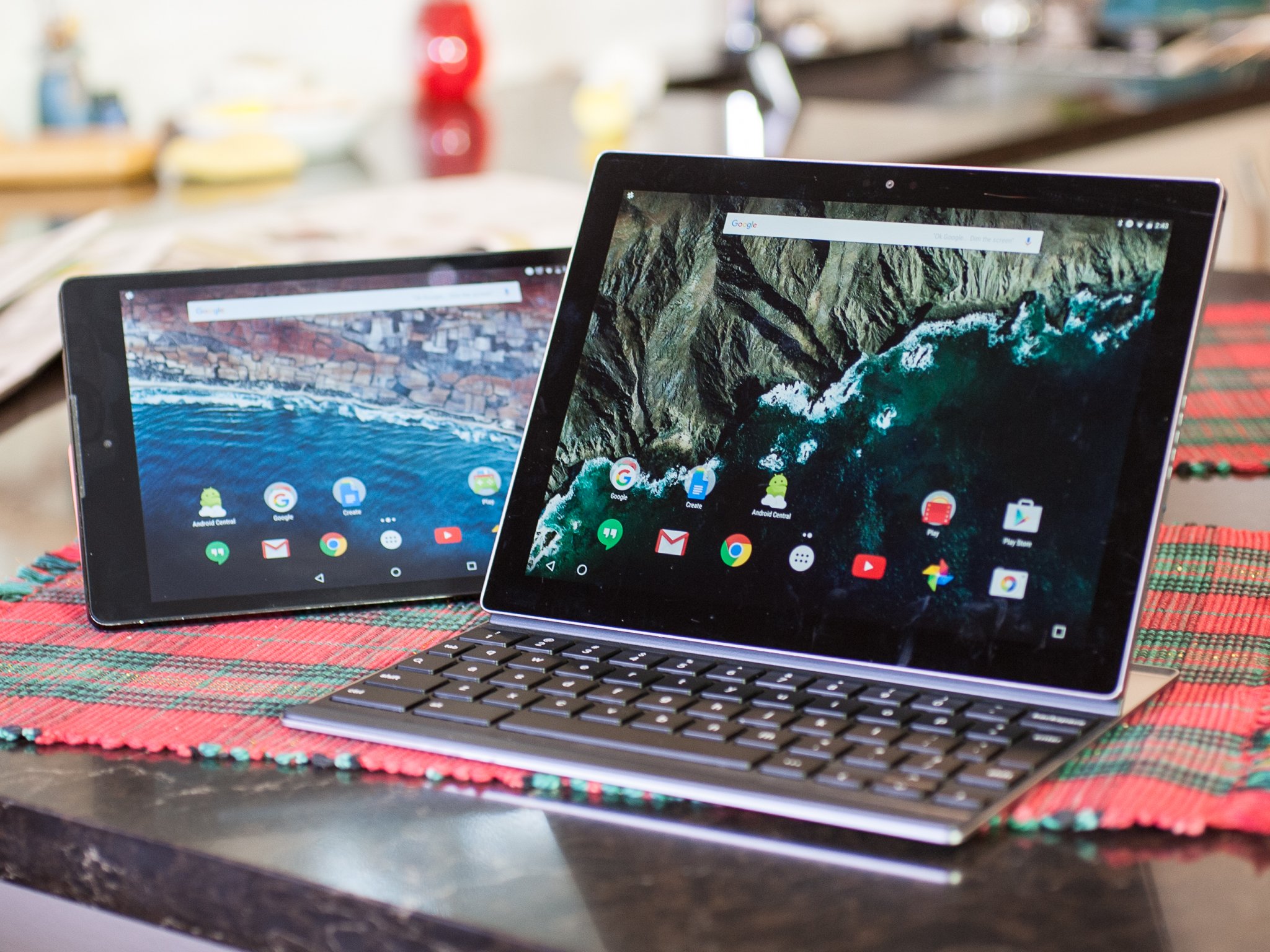
But the Pixel C and the Nexus 9 are two very different devices.
Pixel C and Nexus 9

The look and feel

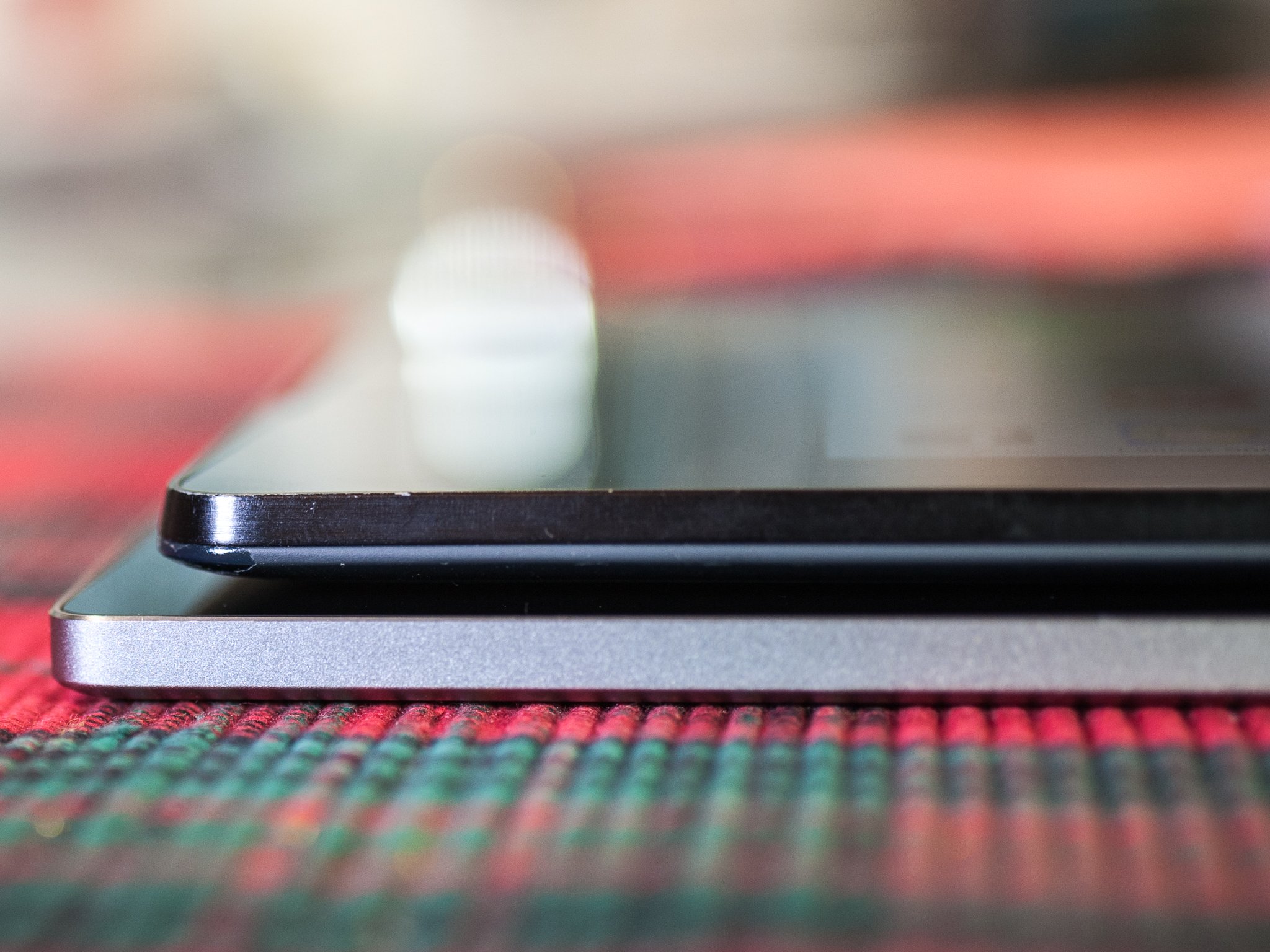
The Pixel C looks like the display got lopped off a Chromebook Pixel, packaged up and sent on its way. It's got the same anodized aluminum. It's got the same edges, for the most part. The same curves. (The same barely curved edges, really.)
The Nexus 9, meanwhile, has a much warmer feel. Soft-touch plastic will do that next to metal, any day of the week. Ultimately that makes it more comfortable for longer periods of time. On the other hand, the Pixel C is very much meant to be used with one of the optional keyboard cases. Or at least it's highly suggested. It's not that it's uncomfortable to hold, it's just not as comfortable as the Nexus 9.
Some of that has to do with its size — 10.2 inches to the Nexus 9's 8.9 inches. (That's the diagonal of the display.) But it has more to do with the materials, and how the Nexus 9 starts its curve to the edge a bit sooner.
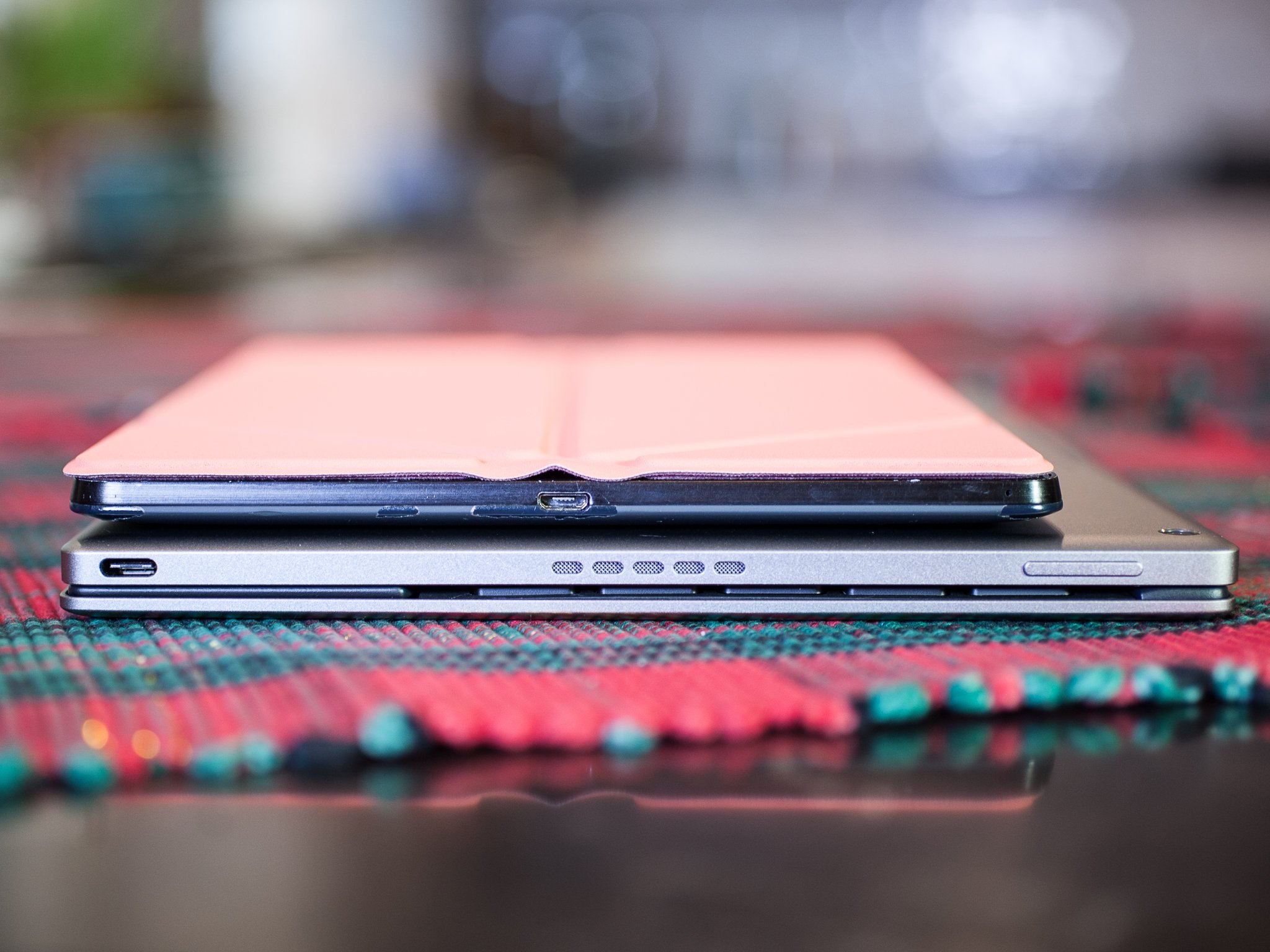
Then there's the matter of weight. The Nexus 9 starts at 425 grams, while the Pixel C starts at 517 grams. Google's official cover for the Nexus 9 (which is what I use on it) takes the total weight up to 560 grams — just 8 percent over a naked Pixel C. (The $129 Nexus 9 Keyboard Folio, which we don't really recommend just because of how cramped it is, takes things up to 769 grams.)
The Pixel C doesn't have a lightweight cover, at least not from Google. That, in our opinion, is a pretty big misstep. There are two keyboard covers available, though. (Both for $149.) The "Pixel C Keyboard" — which uses magnets to very smartly affix itself — raises the total weight to 916 grams and adds another 5.5mm to the 7.5mm tablet. It keeps the display protected when not in use, but you have to slide it off the display to open things back up — and we're already seeing scratches from tiny pieces of grit. That's not good, to put things mildly.
The Pixel C Folio Keyboard adds leather and a proper back plate — and the tablet is meant to just live in here full-time, but again affixed with magnets — more than doubles the thickness to 14.5mm another and takes the weight up to 908 grams.
Either way, you're essentially doubling the Pixel C's weight and thickness with either choice. Whereas the Nexus 9 can sort of just slip into a bag alongside a laptop (I carry a 13-inch Macbook Pro), the Pixel C and keyboard are a lot more conspicuous. The leather Folio Keyboard is a safer choice — with almost zero chance of scratching the screen. The metal keyboard cover looks better and is thinner — but has gouged our Pixel C.
And we left our photos largely in their un-edited state here. That's what my Nexus 9 looks like after a year of being lugged around all over the world. The finish is wearing off some. It looks like it's been used. It'll be interesting to see if the anodized aluminum on the Pixel C shows that sort of wear. (Though the front of the display already is looking like it's been rode hard and put up wet.)
Choose wisely.

Display

As far as square-footage goes, the Pixel C wins out at 10.2 inches diagonally. (And, yes, the Nexus 9 isn't quite a full 9. We've been OK with that.) That is, so long as bigger is better. The Nexus 9 took a little getting used to after two years of 7-inch Nexus 7s — not to mention the different aspect ratio. We went from (roughly) 16:9 — OK, 16:10 and 8:5, to be exact — on the two ASUS models to 4:3 on the HTC-made Nexus 9. That introduced the dreaded letterbox on a lot of videos, and that remains on the Pixel C with its oddball 1:√2 aspect ratio (that's 1 to the square root of 2).
But really it's all about the pixels here. The Pixel C with its 2560x1800 resolution has a few more pixels per inch than the Nexus 9 (308 vs. 281), and combine that with a less-yellow temperature and whatever other magic is being performed, and you have a display that's crisper, not as washed out and really makes colors pop.

You've got NVIDIA's Tegra X1 system to thank at times as well. For games that have been optimized for Tegra, you'll end up seeing more detail on the Pixel C than you will on the Nexus 9. That might not matter when you're using them separately. But side by side, it's noticeable.


Performance

 A confession: I had to look up what processor is inside the Nexus 9. I've been using that tablet for more than a year and for the most part have had no issues with it, outside of some heat while playing graphic-intensive games. (And that's exacerbated by the thinness.) And so I was a little surprised to be reminded that it's running NVIDIA's Tegra K1 system. And on paper the K1 is behind the Tegra X1 that's running in the Pixel C.
The Nexus 9 is the dual-core configuration of K1, with a couple Denver CPUs and 192 CUDA cores for graphics. X1 cranks things up to an oct-core (A57 and A53) processor and 256-core Maxwell GPU.
So what's all that mean for you, actually using the things? Performance on paper is one thing. But it all has to work well with the software. And right now, in the early days of the Pixel C, it definitely seems as though Android 6.0.1 is working better on the Nexus 9, with fewer hangups and app crashes.
But that's not to say you might not see a difference, particularly in games that have been optimized for the Tegra system. Again, you might well see more detailed graphics on the Pixel C, as we have with some titles. On the other hand, you might not notice unless they're side by side. But on normal, everyday tasks? The Nexus 9 probably has a slight edge here, if only for stability on both the OS and application front. Some things just don't play nice in landscape. (Too many things, actually.)
The bigger difference in day-to-day use comes with the battery, though. The Pixel C (again, by benefit of being bigger) has roughly 35% more battery capacity than the Nexus 9. It also charges faster, going from near-dead to full in about 2.5 hours. That makes a big difference in the middle of the day, should you need to juice up. If you charge overnight? Not as big a deal. But I'll take the Pixel C in this round. (And as an added bonus you can charge other devices off the Pixel C. Slowly.)
And it's worth a semi-annoying reminder that the Pixel C uses the new USB-C standard, which will start seeing more traction in 2016.

Speakers

And finally we've got the speakers. HTC has long been the industry leader on this front, thanks to its "BoomSound" feature in phones. And that mostly carried over to the Nexus 9 and its front-facing speakers.
The Pixel C has its speakers on the side, and they do a pretty good job of directing sound forward and not just shooting it out laterally.
But given the overall size of the Pixel C there's a noticeable lack of depth when you compare it to the Nexus 9. It doesn't sound bad — it just doesn't sound as good. Highs are decent, but there's just not as much low end.
Pixel C and Nexus 9

The bottom line

We wouldn't, as the saying goes, kick the Pixel C out of bed. It's a very compelling tablet on just about every front. But its increased size and weight over the Nexus 9 is something to take into consideration. As is the state of the software at this point.
And while we understand Google pushing keyboards on us at first, we still believe not having a more traditional (and much thinner and lighter) cover at launch was a big mistake, particularly given the method by which you have to continuously remove and stow the metal keyboard cover, sliding against the display as it does. Google needs to release a more standard cover, and soon.
And then there's the matter of price. The top-end 32GB Nexus 9 retails on the Google Store for $479 — $20 less than the base model 32GB Pixel C. And you can get the same SKU on Amazon for as low as $300. That's going to be a no-brainer for a lot of folks.
On the other hand, the Nexus 9 is a year old. Newer is almost always better, at least in terms of how long the device will ultimately last you. But we'll not begrudge anyone at this point who's finding it hard to choose the Pixel C over the Nexus 9.


The raw data

Spec Pixel C Nexus 9
OS Android 6.0.1 Android 6.0.1
Display 10.2-inch
LTPS LCD
8.9-inch IPS LCD
Resolution 2560x1800
(308 ppi)
2048x1536
(281 ppi)
Aspect ratio 1:√2 4:3
Processor NVIDIA Tegra X1 NVIDIA Tegra K1
Storage 32 or 64GB 16 or 32GB
Expandable No No
RAM 3GB 2GB
Rear camera 8MP 8MP
Front camera 2MP 1.6MP
Fingerprint No No
Battery 9243 mAh* 6700 mAh
Optional LTE No Yes
Dimensions 242 x 179 x 7 mm 154 x 228 x 7.95
Weight 517 g
(1.139 lbs)
425 g
(0.936 lbs)
Keyboard weight 399 g (metal)
391 g (folio)
135 g (cover only)
344 g (folio keyboard)
Combined weight 916 g (metal)
908 g (folio)
560 g (cover)
769 g (folio keyboard)
* For ease of comparison, battery size converted from watt-hours using 3.7V for calculation


Entri Populer